 Big Board
Get the app
How to put a darts scoreboard on your TV
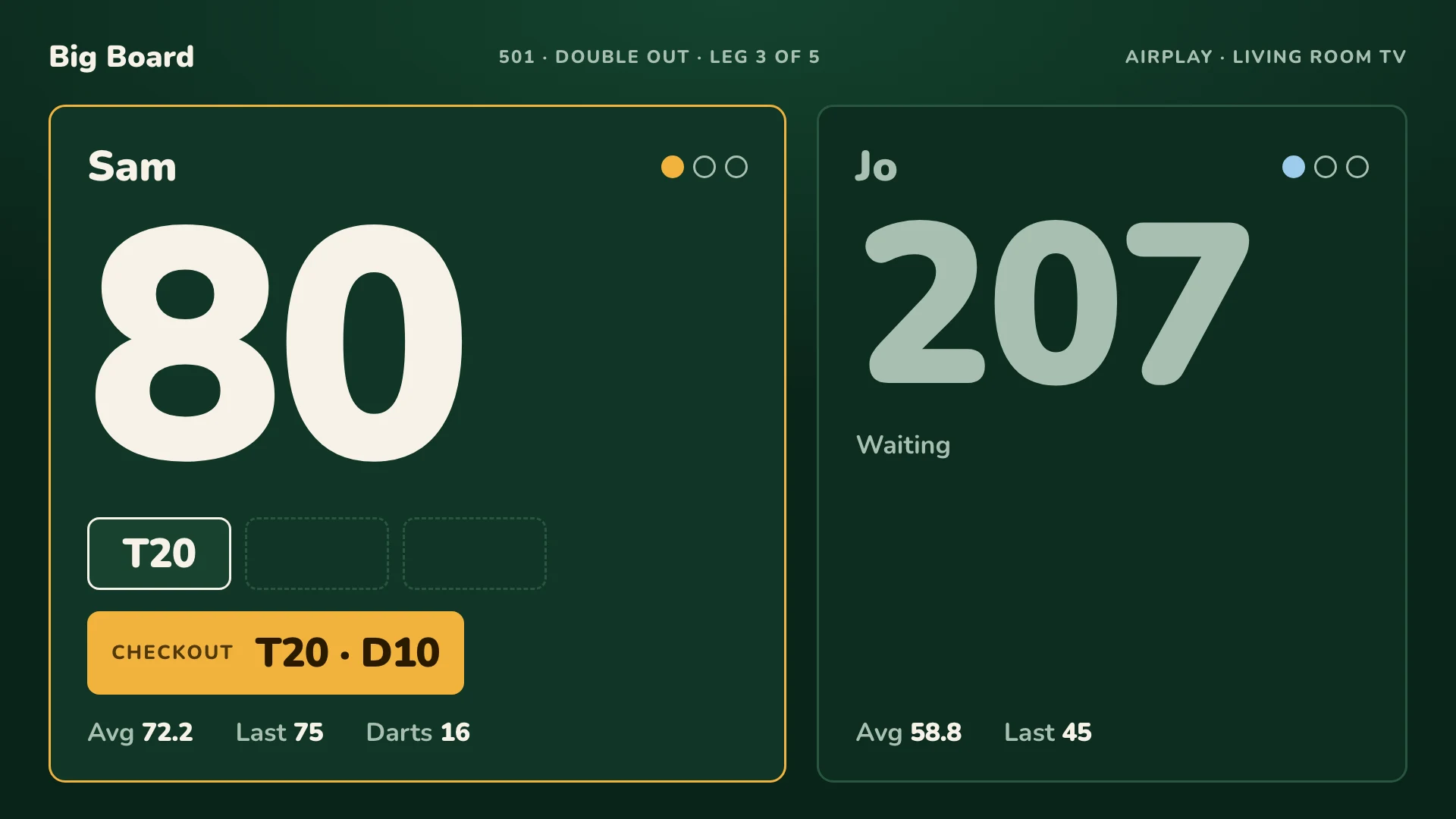
You need an iPhone or iPad running a darts scoring app, and a television it can send a picture to. With Big Board, you start a game, tap TV and pick the television. The TV then shows a scoreboard built for the room while the phone stays in your hand as the keypad.
What you need
- An iPhone or iPad with iOS 26 or later
- Big Board: Darts Scorekeeper, free on the App Store
- One of these: an Apple TV, a television with AirPlay built in, or an HDMI adapter and cable
Three ways to connect
Apple TV
- Needs
- An Apple TV box on the same Wi-Fi network as your iPhone or iPad
- Good for
- Home setups that already have one
AirPlay television
- Needs
- A smart TV with AirPlay built in, on the same Wi-Fi network. Look for AirPlay in the TV's settings menu
- Good for
- No extra box or cable
HDMI adapter
- Needs
- Apple's Lightning Digital AV Adapter, or a USB-C to HDMI adapter for newer iPhones and iPads, plus an HDMI cable
- Good for
- Pubs, clubs and garages with poor or no Wi-Fi
Set it up over AirPlay
- Connect your iPhone or iPad to the same Wi-Fi network as the Apple TV or AirPlay television.
- Open Big Board and start a game of 501 or Cricket.
- Tap TV in the game and pick your television.
- Throw. Every dart you enter on the phone appears on the TV: the remaining score, the darts thrown this turn, and a checkout route when you are on a finish.
Set it up with an HDMI cable
- Plug the HDMI adapter into your iPhone or iPad and run an HDMI cable from it to the TV.
- Switch the TV to that HDMI input.
- Open Big Board and start a game. The scoreboard appears on the TV.
A cable has no Wi-Fi to drop out, which makes it the dependable choice for a league night.
Why a separate TV board beats screen mirroring
Screen mirroring copies your phone to the TV, keypad and all. The score ends up small, and everyone watches you tap keys. Big Board sends the TV a scoreboard of its own instead: the active player's remaining score takes up most of the screen, in digits sized to be read from the oche, 2.37 metres (7 ft 9¼ in) from the board. The phone keeps the keypad to itself.
If the scoreboard does not show
- The TV is not in the list. Check that the phone and the TV are on the same Wi-Fi network, and that AirPlay is switched on in the TV's settings.
- The picture drops out. Pub and club Wi-Fi is often the cause. Use an HDMI adapter instead.
- The TV shows your whole phone screen. That is screen mirroring from Control Centre. Stop mirroring and use the TV button inside the game.
- Still stuck? See support.
What it costs
Big Board is free to download, and scoring 501 and Cricket on your phone stays free. The TV board is free to try. After that it is part of Pro, a one-time purchase with no subscription.
Not sure an app is what you want?
A chalkboard or whiteboard needs no power and no phone, but someone has to do the sums. A wall-mounted electronic scorer does the sums, but its display is small next to a television. An app on the TV gives you the biggest digits in the room and suggests checkouts, at the cost of needing your phone to hand.